Erasing Memory Channel Data
1. Prsss the [V/M] button, if necessary, to enter the VFO mode.
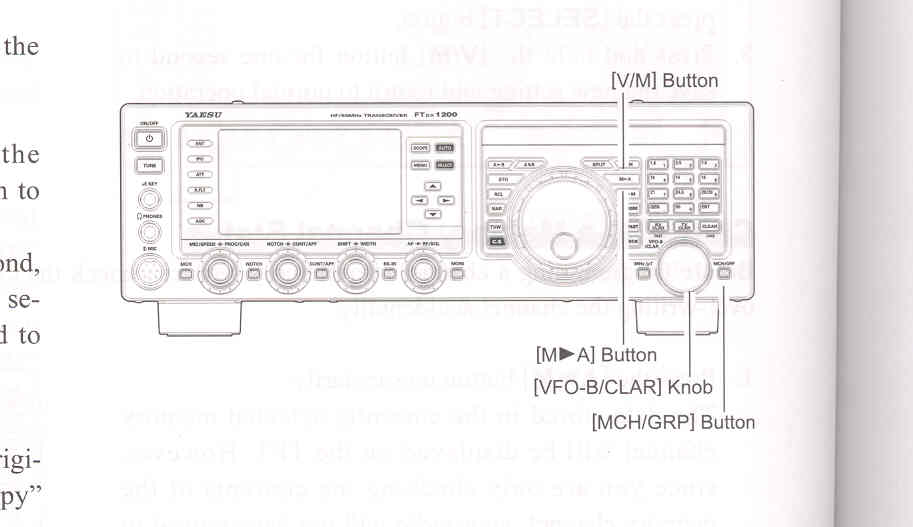
2. Prsss the [A►M] button. The data stored in the currently selected memory channel will be displayed in the display.
3. Rotate the [VFO-B/CLAR] knob to select the memory channel that you would like to erase.
4. Press the [LOCK] button to erase the contents of the selected memory channel.
ADVICE:
1. Prsss the [V/M] button, as necessary, to go to the "Memory" mode.
2. Prsss the [MCH/GRP] button.
3. Rotate the [VFO-B/CLAR] knob to select the memory channel the contents of which you wish to transfer to VFO-A.
4. Prsss and hold in the [M►A] button for one second, until you hear the double beep. The data in the selected memory channel will now be transferred to VFO-A.
ADVICE:
Moving Memory Data to the VFO-A Register
You may transfer the contents of the currently selected memory channel into the VFO-A register, if you like.
This transfer of data to VFO-A does not affect the original contents of the memory channel; this is a "copy" functions that leaves the memory contents unchanged.