FTDX1200 Operating Manual Page 93
MEMORY OPERATION

Previous Page    Index of Topics    Table of Contents    Index of Pages    Next Page

CONVENIENT MEMORY FUNCTIONS

The FTDX1200 contains ninety-nine regular memories, labeled "01" through "99", nine special programmed limit memory pairs, labeled "P-1L/P-1U" through "P-9L/P-9U", and five QMB (Quick Memory Bank) memories, labeled "C-1" through "C-5". Each stores various settings, in addition to the VFO-A frequency and mode (See below). By default, the 99 regular memories are contained in one group; however, then can be arranged in up to six separate groups, if desired.


QUICK POINTS:
The FTDX1200 memory channels store the following data (not just the operating frequency):

VFO-A Frequency.
VFO-A Mode.
Clarifier status and its Offset Frequency.
ANT status.
IPO status.
Roofing filter status and its Bnadwidth.
Attenuator status.
Noise Blanker status.
IF SHIFT and WIDTH status.
CONTOUR status and its Peak Frequency.
DSP Noise Reduction (DNR) status and its Reduction algorithm selection.
DSP Notch filter (NOTCH) status.
NAR bandwidth status.
DSP Auto Notch filter (DNF) status.
Repeater Shift Direction.


End of "Convenient Memory Functions"


QMB (QUICK MEMORY BANK)

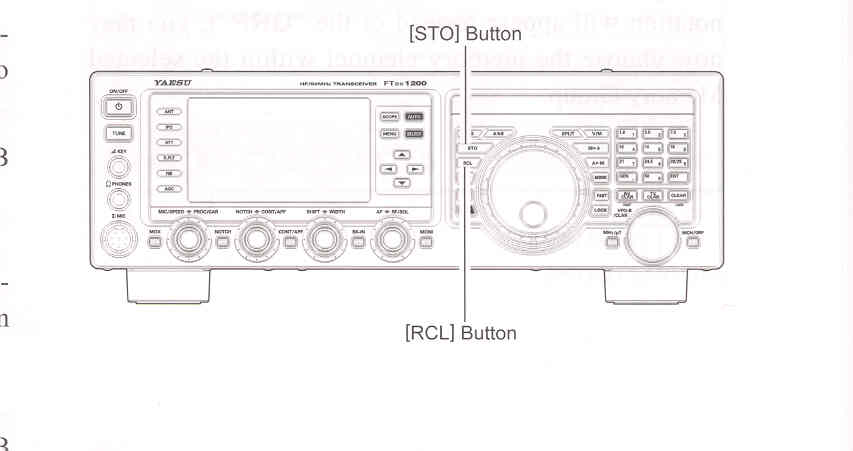
The Quick Memory Bank consists of five memories (labeled "Q-1" through "Q-5") independent from the regular and PMS memories. These can quickly store operating parameters for later recall.


QMB Channel Storage
    1. Tune to the desired frequency on the VFO-A.

    2. Press the blue [STO] button. The "beep" will confrim that the VFO-A contents have been written to the currently available QMB memory.

If you repeatedly press the [STO] button, the QMB memories will be written in the following order:

Q-2 -> Q-3 -> Q-4 -> Q-5 -> Q-1.

Once all five QMB memories have data on them, previous data (starting with channel Q-1) will be over-written on a first-in, first-out basis.


QMB Channel Recall
    1. Press the blue [RCL] button. The current QMB channel data will be shown on the frequency display area. The "QMB" icon will also appear and the Memory Mode indicators in the LED indicators area will illuminate.

    2. Repeatedly pressing the [RCL] button will toggle you through the QMB channels:

Q-2 -> Q-3 -> Q-4 -> Q-5 -> Q-1.

    3. Press the [V/M] button to return to the VFO or Memory mode.


ADVICE:
Rotating the Main Tuning Dial know, or changint the operating mode, will place the transceiver in the "Memory Tune" mode, which is a temporary "pseudo-VFO" method of tuning off of a stored memory channel. If you do not over-write the contents of the current memory channel, the original contenst will not be disturbed by the initiation of Memory Tune operation.


End of "QMB (Quick Memory Bank)"

Cont'd Next Page "Memory Operation"

Previous Page    Index of Topics    Table of Contents    Back to Top    Index of Pages    Next Page

FTDX1200 Operating Manual Page 93