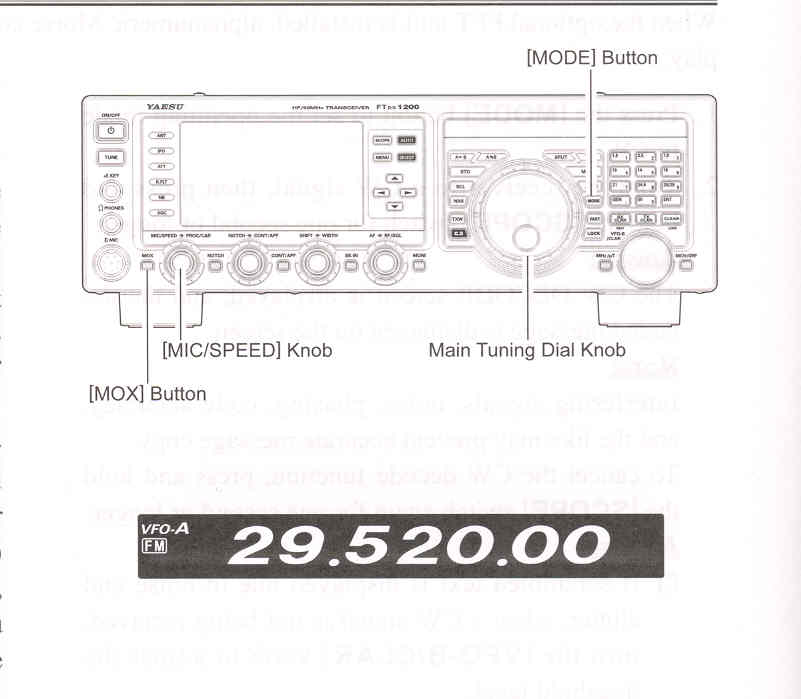
1. Press the [MODE] button repeatedly, until the FM icon appears in the display, to select the FM operation mode.
2. Rotate the Main Tuning Dial knob to select the desired operating frequency. Pressing the microphone [UP] or [DWN] buttons will cause frequency change in 5 kHz steps.
3. Press the microphone PTT switch (or press the front panel [MOX] button) to transmit. Speak into the microphone in a normal voice level. Release the PTT or [MOX] switch to return to receive.
4. Adjustment of the microphone gain may be accomplished in two ways. At the factory, a default level has been programmed that should be satisfactory for most situations. However, using Menu item "085 FM MIC GAIN", you may set a differnt fixed value, or choose the "MCVR" option which then lets you use the front panel [MIC/SPEED] knob to set the microphone gain in the FM mode.
ADVICE: