Page 84 FTDX1200 Operating Manual

CW CONVENIENCE FEATURES Cont'd

Previous Page    Index of Topics    Table of Contents    Index of Pages    Next Page

CONTEST MEMORY KEYER (USING THE OPTIONAL FH-2 REMOTE CONTROL KEYPAD)

You may also utilize the CW message capability of the FTDX1200 from the optional FH-2 Remote Control Keypad, which plugs into the rear panel REM jack.

Message Memory
Five memory channels capable of retaining 50 characters each are provided (using the "PARIS" standard for characters and word length).

Example: CQ CQ CQ DE W6DXC K (19 characters).

_._.  _ _._    _._.  _ _._    _._.  _ _._    _..    .     ._ _  _ ....  _ ..  _ . . _  _._.      _ . _

(C)   (Q)     (C)    (Q)     (C)   (Q)     (D) (E)   (W)  (6)   (D)    (X)    (C)      (K)


Storing a Message Into Mamory

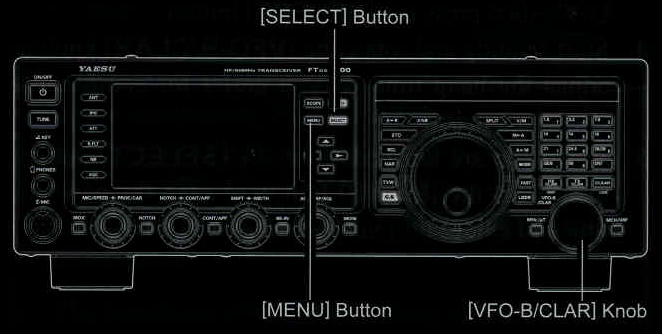
    1. Press the [MENU] button to enter the Menu mode.

    2. Rotate the [VFO-B/CLAR] knob (or press the ▲ / ▼ button) to select the CW Memory Register into which you wish to store the message; for now, we are just setting the message entry technique to (Keyer entry).

027 CW MEMORY 1
028 CW MEMORY 2
029 CW MEMORY 3
030 CW MEMORY 4
031 CW MEMORY 5

    3. Press the [SELECT] button, then rotate the [VFO-B/CLAR] knob (or press the ▲ / ▼ button) to set the selected CW Memory Register to "MESSAGE". If you want to use your keyer paddle for message entry on all memories, set all five Menu items (#027 ~ #031) to "MESSAGE".

    4. Press the [SELECT] button, then press the [MENU] button to save the new setting and exit.


TERMINOLOGY:
PARIS Word Length: By convention among CW and Amateur operators (utilized by ARRL and others), the length of one "word" of CW is defined as the length of the Morse Code characters spelling the word "PARIS". This character (dot/dash/space) length is used for the specific definition of code speed in "words per minute".

NOTE:
You must exercise care in sending to ensure that the spaces beteen letters and words are accurately done; if your timing is off, the spacing may not come out right in the stored message. For ease in setting up the keyer memories, we recommend you set Menu item "018 F KEYER TYPE" and/or "020 R KEYER TYPE" to "ACS" (Automatic Character Spacing) while you are programming the keyer memories.

Contest Number Programming

Use this process if you are starting a contest, of if somwhow you get out of sync with the proper number in the middle of a contest.


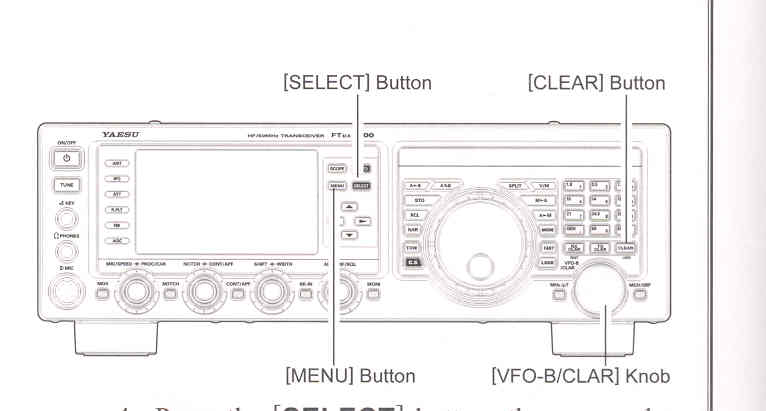
    1. Press the [MENU] button to enter the Menu mode.

    2. Rotate the [VFO-B/CLAR] knob (or press the ▲ / ▼ button) to select Menu item "026 CONTEST NUMBER". The current contest number appears on the TFT display.

    3. Press the [SELECT] button, then rotate the [VFO-B/CLAR] knob (or press the ▲ / ▼ button) to set the Contest Number to the desired value.

ADVICE:
Press the [CLEAR] button (located at the upper right of the [VFO-B/CLAR] knob) to reset the Contest Number to "1".

    4. Press the [SELECT] button, then press the [MENU] button to store the new number and exit.


Cont'd Next Page "Contest Memory Keyer (Using the Optional FH-2 Remote Control Keypad)"

Cont'd Next Page "CW Convenience Features"

Previous Page    Index of Topics    Table of Contents    Back to Top    Index of Pages    Next Page

Page 84 FTDX1200 Operating Manual