FTDX1200 Operating Manual Page 81

CW CONVENIENCE FEATURES

Previous Page    Index of Topics    Table of Contents    Index of Pages    Next Page

CW SPOTTING (ZERO BEATING)

"Spotting" (zeroing in on another CW station) is a handy technique to ensure you and the other station are precisely on the same frequency.

The Tuning Offset Indicator in the display may also be moved so you can adjust your receiver frequency to center the incoming station on the pitch corresponding to that of your transmitted signal.


Using the Auto Zeroing System
(Only when the optional FFT unit is installed)

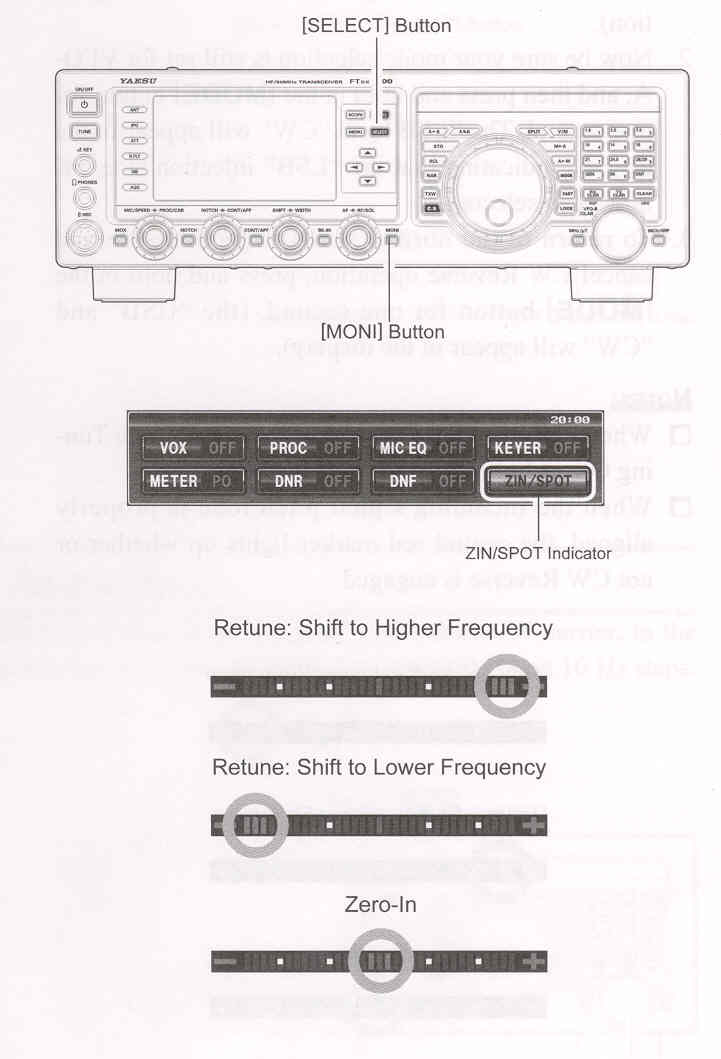
Press the [▲ / ▼ / ◄ / ►] button to select the "ZIN/SPOT". Press the [SELECT] switch momentarily to adjust the receiving frequency to the zero-in automatically while receiving the CW signal.

Using the Spot System

Press the [▲ / ▼ / ◄ / ►] button to select the "ZIN/SPOT". Press the [MONI] button, then while pressing the front panel [SELECT] button, the Spot tone will be heard through you speaker. This tone corresponds to the pitch of your transmitted signal. If you adjust the receiver frequency until the pitch of the received CW signal matches that of the Spot tone, your transmitted signal will precisely matched to that of the other station. Release the [SELECT] button to turn the Spot tone off.

ADVICE:

In a tough DX pile-up, you may actually want to use the SPOT system to find a "gap" in the spread of calling stations, instead of zeroing in precisely on the last station being worked by the DX station. From the DX side, if a dozen or more operators (also using Yaesu's SPOT system) all call precisely on the same frequency, their dots and dashes merge into a single, long tone that the DX station cannot decipher. In such situations, calling slightly higher or lower in frequency may get your call through.

The Tuning Offset Indicator in the display may be utilized for CW frequency adjustment, as well. Its configuration is set via Menu item "011 BAR DISPLAY SELECT " at the factory, and the Tuning Offset Indicator is already set to the "CW TUNE" selection.

QUICK POINTS:

The CW Spotting process utilizes the Spot tone or the Tuning Offset Indicator. The actual offset pitch is set by Menu item "056 CW PITCH". The offset pitch may be set to any frequency between 300 Hz and 1050 Hz, in 50 Hz steps. You can either match tones audibly (using the [SELECT] button) or tune the receiver frequency so that the central red marker on the Tuning Offset indicator lights up. Note that there are 31 "dots" on the Tuning Offset Indicator, and depending on the resolution selected, the incoming CW signal may fall outside the visible range of the bar indicator, if you are not reasonably close to the proper alignment of tones.


The displayed frequency on CW normally reflects the "zero-beat" frequency of your offset carrier. That is, if you were to listen on USB on 14.100.00 MHz to a signal with a 700 Hz offset, the "zero beat" frequency of the CW carrier would be 14.100.70 MHz, the latter frequency is what the FTDX1200 displays, by default. However, you can change the display to be identical to what you would see on SSB by using Menu tiem "066 CW FREQ DISPLAY" and setting it to "DIRECT FREQ" instead of the default "PITCH OFFSET" setting.


End of "CW Spotting (Zero Beating)"


Cont'd Next Page "CW Convenience Features"

Previous Page    Index of Topics    Table of Contents    Back to Top    Index of Pages    Next Page

FTDX1200 Operating Manual Page 81