1. Press and hold the [C.S.] until the clock
digits blink.
2. Enter the present time with the number
keys ([BAND] keys).
3. Press the [ENTER] button.


| FTDX1200 Operating Manual | Page 7 |
|
Use the following procedure to adjust the clock shown at the middle right of the TFT display.
1. Press and hold the [C.S.] until the clock
2. Enter the present time with the number 3. Press the [ENTER] button.
|
|
|
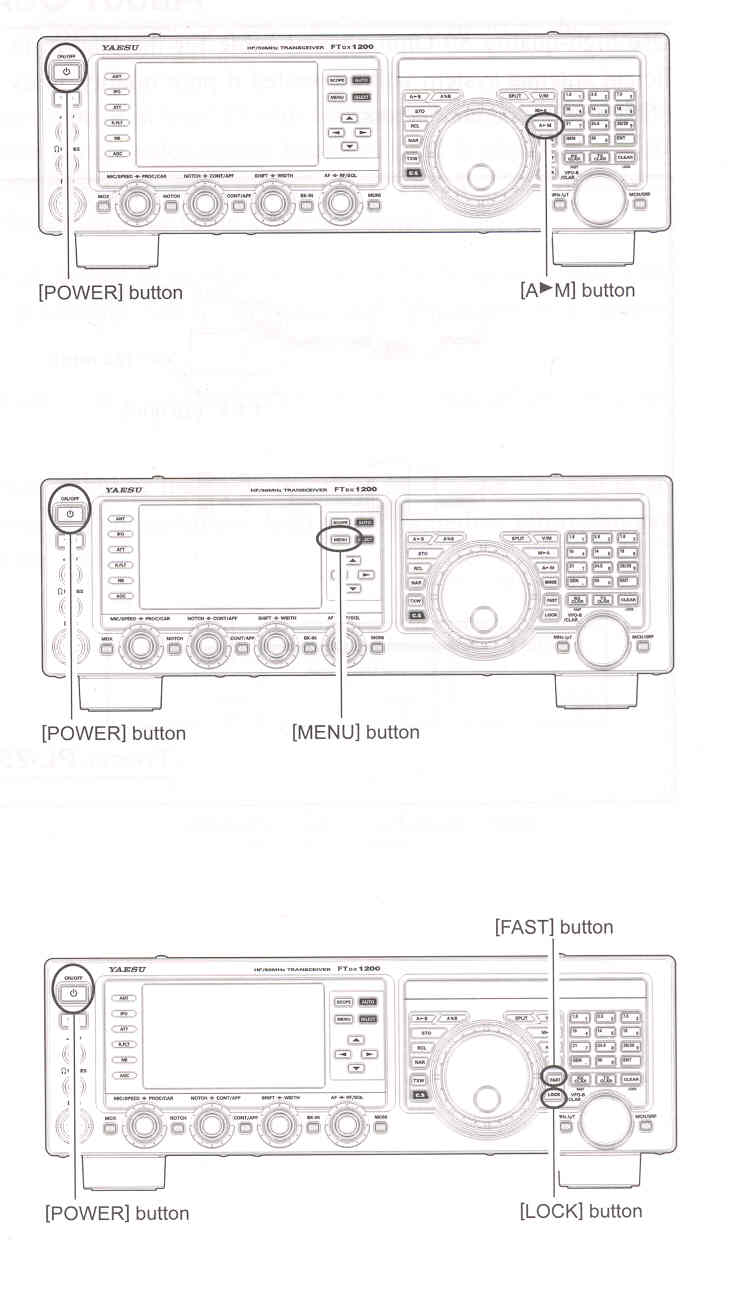
RESETTING MEMORIES (ONLY)
Use this procedure to reset (clean) the previously stored Memory channels, without affecting any configuration changes you may have made to the Menu settings.
1. Press the front panel [POWER] switch to
2. While holding the [A►M] button in, press MENU RESETTING
Use this procedure to restore the Menu settings to their factory defaults, without affecting the memories you have programmed.
1. Press the front panel [POWER] switch to
2. While holding the [MENU] button in, FULL RESET
Use this procedure to restore all Menu and Memory settings to their factory defaults. All memories will be cleared by this procedure.
1. Press the front panel [POWER] switch to
2. While holding the [FAST] and [LOCK]
IMPORTANT NOTE:
|

|
| FTDX1200 Operating Manual | Page 7 |