FTDX1200 Operating Manual Page 69

ENHANCING TRANSMIT SIGNAL QUALITY Cont'd

Previous Page    Index of Topics    Table of Contents    Index of Pages    Next Page

USING THE SPEECH PROCESSOR (SSB MODE)


The FTDX1200 Speech Processor is designed to increase "talk power" by increasing the average power output (via a sophisticated compression technique) and adjusting the audio quality to the menu settings ("168 P-PRMTRC EQ1 FREQ", "171 P-PRMTRC EQ2 FREQ", "174 P-PRMTRC EQ3 FREQ"). The result in improved intelligibility when conditions are difficult.

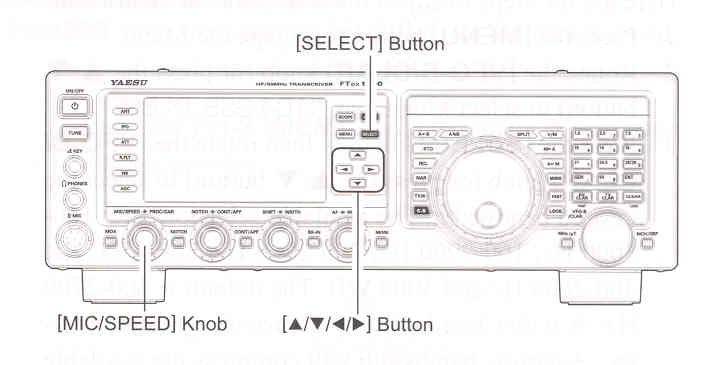
    1. Adjust the [MIC/SPEED] knob, as described on page 63.

    2. Press the [◄ / ► / ▲ / ▼] button to select the "METER", then press the [SELECT] to select "COMP" (Compression meter).

    3. Press the [◄ / ► / ▲ / ▼] button to select "PROC", then press the [SELECT] to select "ON". The "PROC" will appear in the display, confriming that the Speech Processor is engaged.

    4. Press the PTT on the microphone, and speak into the microphone in a normal voice level.

    5. Adjust the [PROC/CAR] knob to set the compression level within the 5 dB to 10 dB range.


    6. To switch the Speech Processor off, Press the [SELECT] button once more. The "PROC" will turn off, confirming that the Speech Processor is turned off. ADVICE:
You may set the RF output power via Menu item "177 TX MAX PWR", whether or not the Speech Processor is engaged.

You may adjust the Parametric Microphone Equalizer when the speech processor is engaged, using Menu items "168" through "176". See page 124 for details.


End of "Using the Speech Processor (SSB Mode)"

Cont'd Next Page "Enhancing Transmit Signal Quality"

Previous Page    Index of Topics    Table of Contents    Back to Top    Index of Pages    Next Page

FTDX1200 Operating Manual Page 69