The Parametric Equalizer is a unique technique for adjusting the signal quality. The three audio ranges may be adjusted so pricisely, it is possible to craft an audio responce that provides a natural and pleasant sound that you may not have ever experienced before. Alternately, the effective "talk power" can be significantly enhanced. <> The aspects of configuration that you may adjust on the Parametric Equalizer are:
Center Frequency: The center frequency of each of the three bands may be adjusted.
Gain: The amount of enhancement (or suppression) within each band may be adjusted.
Q: The bandwidth over which the equalization is applied may be adjusted.
|
1. Connect the microphone to the MIC jack. 2. Set the RF output power to minimum value via Menu item "177 TX MAX POWER", so you will not cause interference to other users while making adjustments.
ADVICE:
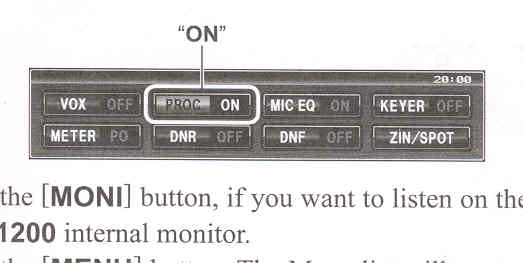
3. To adjust teh Parametric Microphone Equalizer while the speech processor is disabled, press the [◄ / ► /
▲ / ▼] button to select the "MIC EQ", then press the [SELECT] button to select "ON".

To adjust teh Parametric Microphone Equalizer with the speech processor is engaged, press the [◄ / ► / ▲ / ▼] button to select the "PROC", then press the [SELECT] button to select "ON". 
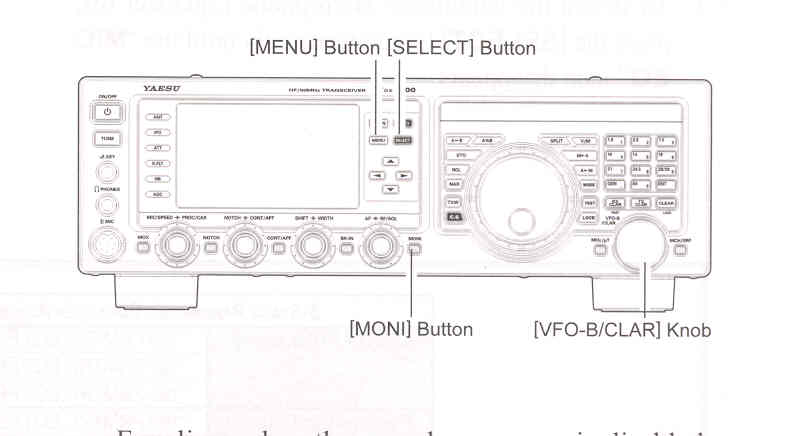
4. Press the [MONI] button, if you want to listen on the
FTDX1200
internal monitor.
5. Press the [MENU] button. The Menu list will appear in the display.
6. Rotate the [VFO-B/CLAR] knob (or press the ▲ / ▼ button) to find the "EQ" Menu area, containing Memu items "159" through "167"; these parameters apply to the adjustment of the Parametric Microphoner
|

Equalizer when the speech processor is disabled. Menu items "168" through "176" apply to the adjustment of the Parametriv Microphone Equalizer when the speech processor is engaged.
7. Press the [SELECT] button, then rotate the [VFO-B/CLAR] knob (or press the ▲ / ▼ button) to perform adjustments to a particular Menu item.
8. Close the "PTT" switch, and speak into the microphoned while listening to the effect of the changes you are making.
Because the overall effect on the sound will change with each adjustment, you should make several passes through each adjustment area, to be sure that you are achieving the optimum settings.
9. When you have completed all adjustments, press the [SELECT] button, then press the [MENU] button to save the new settings and exit to normal operation.
If you only press the [MENU] button momentarily to exit, non of the changes you performed will be stored.
ADVICE:
|