Page 60 FTDX1200 Operating Manual

TOOLS FOR COMFORTABLE AND EFFECTIVE RECEPTION Cont'd

Previous Page    Index of Topics    Table of Contents    Index of Pages    Next Page

AUDIO PITCH CONTROL (SSB MODE)

The FTDX1200 permits adjustment of the receiver audio response by shifting the carrier point during SSB operation.

    1. Press the [MENU] knob to enter the Menu mode.

    2. Rotate the [VFO-B/CLAR] knob (or press the [▲/▼] button) to select Menu item "105 LSB RX CARRIER" or "106 USB RX CARRIER".

    3. Press the [SELECT] button.

    4. Rotate the [VFO-B/CLAR] knob (or press the [▲/▼] button) to adust the receiver audio response as desire.

    5. Press the [SELECT] button, then press the [MENU] button to save the new setting and exit to normal operation.


End of "Audio Pitch Control (SSB Mode)"


AUDIO PEAK FILTER

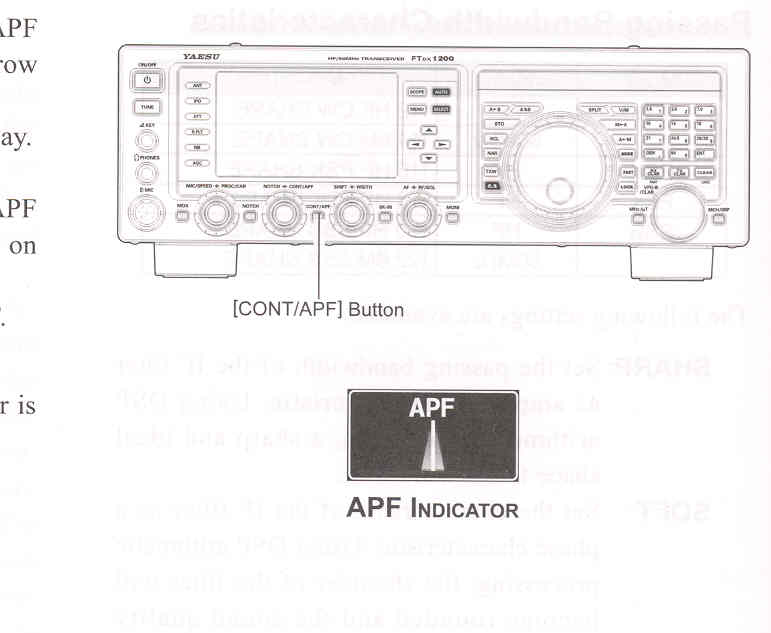
    1. Press the [CONT/APF] knob to activate the APF (Audio Peak Filter) which provides a very narrow audio bandwidth.
The "APF" indicator will appear in the DSP display.

ADVICE:
When APF is engaged, the peak position of the APF is depicted graphically in the NOTCH indicator on the display

    2. Press the [CONT/APF] button to disable the APF.

ADVICE:
The APF may only be activated while the transceiver is in CW mode.


End of "Audio Peak Filter"

Cont'd Next Page "Tools for Comfortable and Effective Reception"

Previous Page    Index of Topics    Table of Contents    Back to Top    Index of Pages    Next Page

Page 60 FTDX1200 Operating Manual