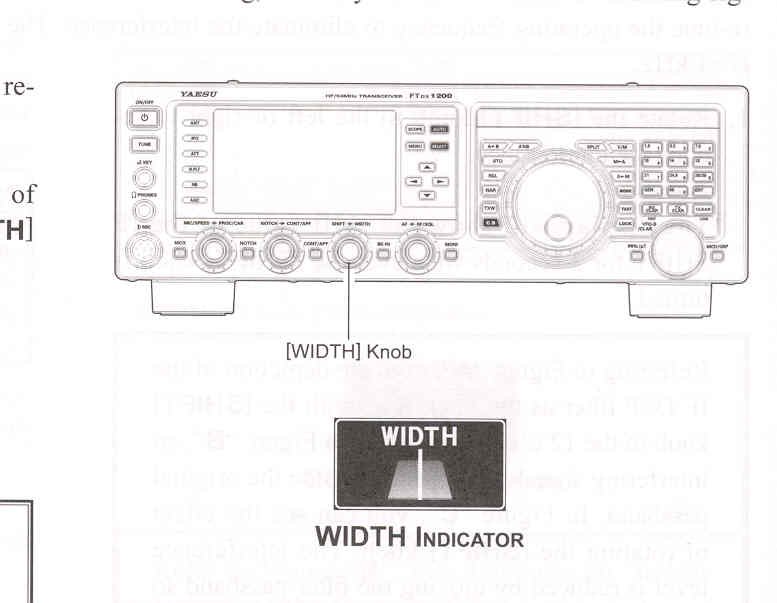
- Rotate the [WIDTH] knob to the left or right to reduce the interference.
ADVICE:
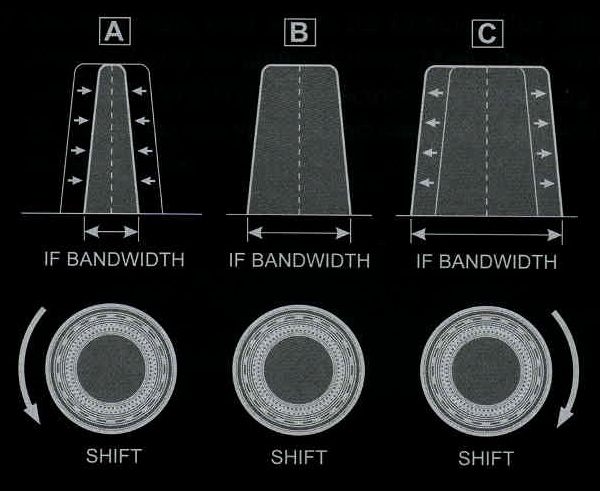
Referring to Figure "B", you can see the default bandwidth on the SSB mode.
By rotating the [WIDTH] knob to the left, the bandwidth will narrow (see Figure "A", while rotation of the [WIDTH] knob to the right, as depicted in Fugure "C", will increase the bandwidth).
The frequency display will show the bandwidth of the IF passband for 3 seconds whenever the [WIDTH] knob is turned.

The default bandwidths, and total bandwidth adjustment range, will vary according to the operating mode:
SSB Mode: 1.8 kHz ~ 4.0 kHz (default: 2.4 kHz)
CW Mode: 500 Hz ~ 2.4 kHz (default: 2.4 kHz)
RTTY/DATA Modes: 500 Hz ~ 2.4 kHz (default: 500 Hz)

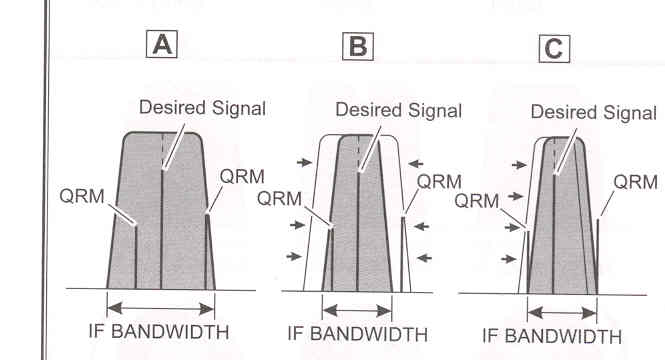
The IF SHIFT and Variable IF WIDTH features together form a very effective interference-fighting filtering system.
For example, in Figure "A", you can see how interference has appeared both on the high and low sides of the desired signal. Rotate the [WIDTH] knob, the interference from one side can be eliminated (Figure "B"). Nest, rotated the [SHIFT] knob to re-position the passband (Figure "C"), the interference on the opposite side can be removed, without re-introducing the interference previously eliminated in Figure "B".

ADVICE:
For best interference reduction, the WIDTH and SHIFT features are the primary tools you should use, after narrowing the bandwidth (WIDTH) and/or adjusting the center of the passband (SHIFT). The Contour control may then yield additional signal-enhancement benefits on the net residual bandwidth. Even more, the IF NOTCH Filter (described later) may also be used, in conjunction with these filter systems, to significant advantage.