Page 50 FTDX1200 Operating Manual

INTERFERENCE REJECTION Cont'd

Previous Page    Index of Topics    Table of Contents    Index of Pages    Next Page

R.FLT (ROOFING FILTERS)

Narrow-band Roofing Filters of 15 kHz, 6 kHz, 3 kHz bandwidths are provided in the first IF, right after the first mixer. These filters provide protection for the 2nd mixer, DSP, and other circuitry that follow and can dramatically improve reception on a very crowded band (during a contest, etc.). Typically, the AUTO selection mode is satisfactory for most operating situations.

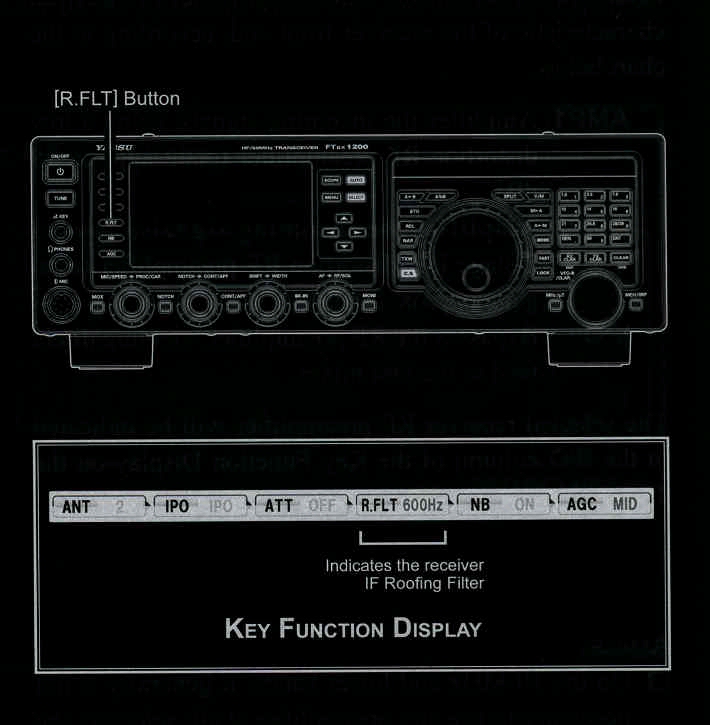
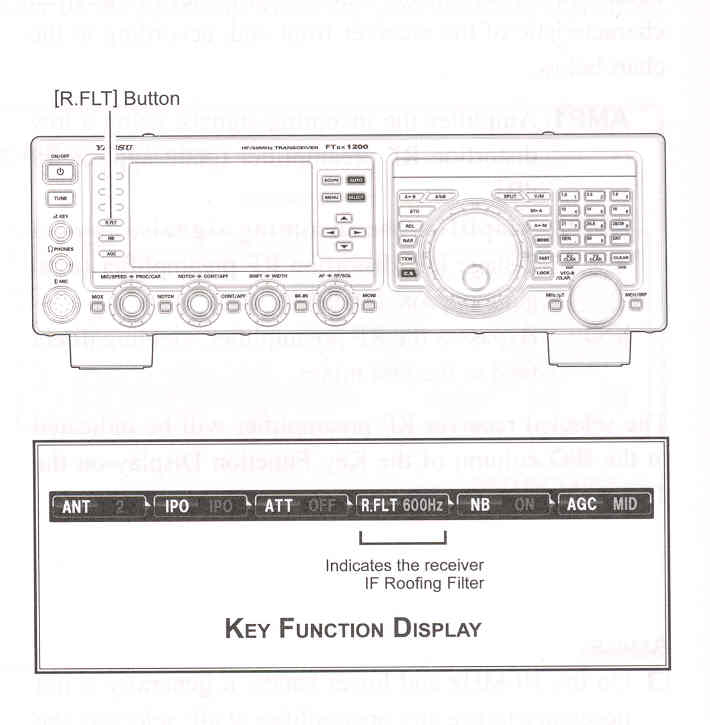
Press the [R.FLT] button to toggle the Roofing Filter selection.

AUTO*1 -> 3 kHz -> 6 kHz -> 15 kHz -> AUTO .....

*1: The AUTO selection mode selects the optimum bandwidth of the Roofing filter for the reception mode.
In this case, the selected bandwidth in the R.FLT column of the Key Function Display glows green (Normally glows blue).

ADVICE:

In the AM/FM mode, only the 15 kHz Roofing Filter is utilized.

As you repeatedly press the [R.FLT] button, the selected Roofing Filter bandwidth will be displayed in the R.FLT column of the Key Function Display on the TFT display, denoting the Roofing Filter currently in use.

Typically, this selection will be set to "AUTO".

QUICK POINT:
The "AUTO" selection of the Roofing Filter is based on the operating mode. However, you may override the automatic selection, if band conditions warrant a different (usually a tighter) selection

TERMINOLOGY:
A "Roofing Filter," as its name implies, places a 'Roof' over the receiver IF system bandwidth. Starting at the first mixer, the Roofing filter protects the circuitry downstream from strong signals, just as a roof on a house protects the contents from rain and snow.
End of "R.FLT (Roffing Filters)"

Cont'd Next Page "Interference Rejection"

Previous Page    Index of Topics    Table of Contents    Back to Top    Index of Pages    Next Page

Page 50 FTDX1200 Operating Manual