FTDX1200 Operating Manual Page 47

INTERFERENCE REJECTION Cont'd

Previous Page    Index of Topics    Table of Contents    Index of Pages    Next Page

µTUNE FILTER (REQUIRES THE OPTIONAL RF µTUNNING KIT)

The RF µTuning Kit provides ultra-sharp RF selectivity for the front end of the transceiver. Very high Q is made possible by the narrow-band design. Three RF µTuning Kits are available. The MTU-160 covers the 1.8 MHz band. The MTU-80/40 covers the 3.5 and 7 MHz bands. The MTU-30/20 covers the 10.1 and 14 >?MHz bands.

When any (or all) of the three optional units are connected, they will be automatically adjusted to center on your operating frequency.

The narrow bandwidth is especially useful on the low bands, when may strong signals are being received via NVIS propagation (Near Vertical-Incidence Signal) within a narrow bandwidth. The added protection for the RF stage is especially helpful in preventing IMD and blocking.

µTuning Operation

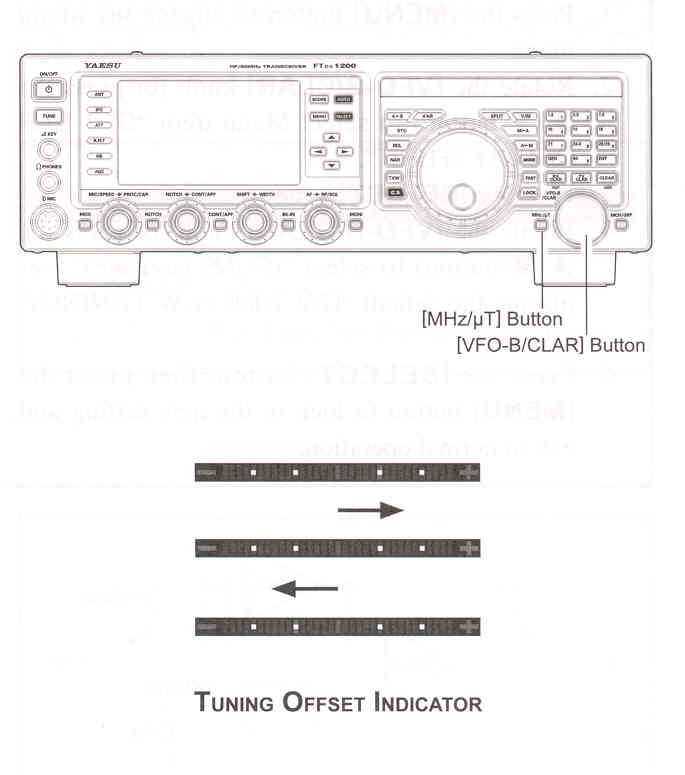
    1. Press and hold in the [MHz/µT] for one second to activate the µTune filter. The "µTune" will appear on the TFT display. The [VFO-B/CLAR] knob works as the µTUNING knob.

ADVICE:
The µTune circuit will automatically align itself to the operating frequency.

Remember that µTune only operates on 14 MHz and lower bands.

    2. Rotate the [VFO-B/CLAR] knob to peak the response (background noise) or reduce interference.

ADVICE:
You may observe the relative peak point of the µTune filter in the Tuning Offset Indicator on the display, while tuning the [VFO-B/CLAR] knob.

The amount of change in the center frequency of the µTune filter, when rotating the [VFO-B/CLAR] knob, can be cofigured using Menu item "046 µTUNE DIAL STEP".

If the µTune filter has been manually adjusted away from the center frequency, you may press the [CLEAR] button to re-center the filter response on the curent operating frequency.

    3. Press and hold in the [MHz/µT] button for one second to disengage the µTune filter.

ADVICE:
Alternate presses of the [MHz/µT] button will switch the µTune filter between on or off.

ADVICE:

You may change the indicaton of the Tuning Offset Indicator to display the µTune filter continuously while the µTune filter is activated. This is Menu item "011 BAR DISPLAY SELECT". See "Changing the Tuning Offset Indicator" on the next page for details of the setting.

The µTune filters are the most advance, selective RF preselector filters ever incorporated into an Ameteur Radio transceiver. The RF selectivity provided by µTune can be of


tremendous value in ensuring quiet, intermod-free reception even in the most croweded bands on a contest weekend. The µTune filters provide RF selectivity on the order of a few dozen kHz at -6dB, at the expense of a few dB of system gain on bands where noise figure is seldom an issue. You will notice that the S-meter deflection, when µTune is engaged, is slightly less than when it is out of the circuit; this is normal. If your antenna system gain is so low you cannot hear the band noise when µTune is engaged (highly unlikely), just switch it out, to eliminate the slight insertion loss.


Cont'd Next Page "µTune Filter (Requires the Optional RF µTuning Kit)"

Cont'd Next Page "Interference Rejection"

Previous Page    Index of Topics    Table of Contents    Back to Top    Index of Pages    Next Page

FTDX1200 Operating Manual Page 47