FTDX1200 Operating Manual Page 31

OPTIONAL FH-2 SWITCHES

Previous Page    Index of Topics    Table of Contents    Index of Pages    Next Page

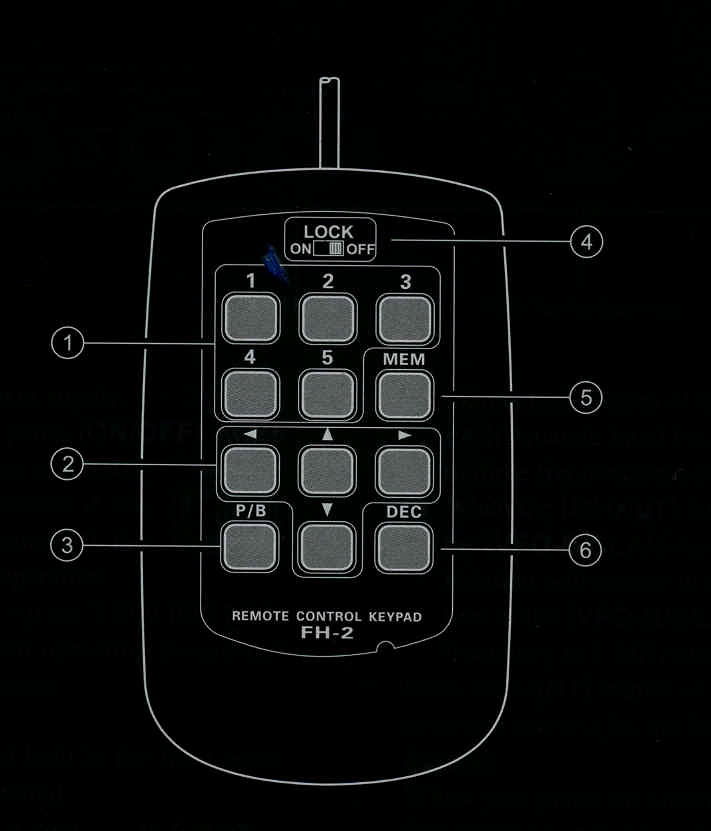
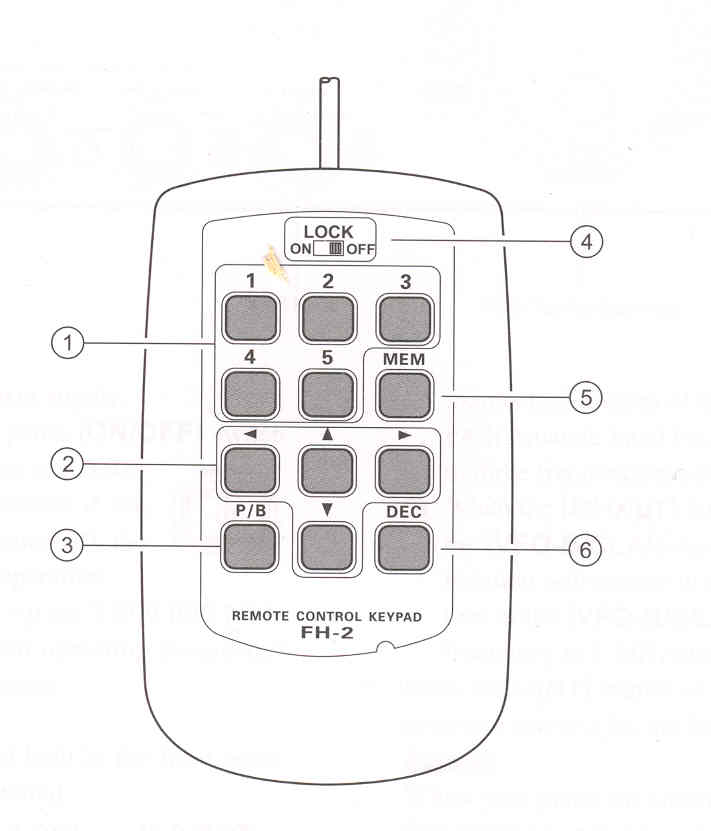
The optional Remote Control Keypad FH-2 can be used to control the optional DVS-6 Voice Memory capabilityfor the SSB/AM/FM modes; the contest memory keyer for the CW mode; and the text memore for the RTTY/DATA modes.
Some specific capabilities of the FH-2 are:

O  On SSB/AM/FM modes, five channels of storage and playback of voice memory (20 seconds each), using your own voice for recorting (see page 71).

O  On CW mode, the FH-2 provides storage and recall of CW messages for repetitive CQ and contest automatic number transmissions (see page 85).

O  On RTTY/DATA mode, the FH-2 provides storage and recall of TEXT messages for repetitive CQ transmissions (see pages 104, 106).

(1) [1], [2], [3], [4], [5] Switches
These buttons work as the Voice Memory and CW Message Memory Selection Key.
In the case of Voice Memory, up to 20 seconds of audio may be stored on each channel.
For CW Messages and CW Text Messages, up to 50 characters ("PARIS" specification) may be stored into each channer.


(2) [◄], [►], [▲], [▼] Switches
Usually, these buttons are used for tuning the VFO frequency. Press the [▲]/[▼] to change the frequency in the same increments as the microphone [UP/DWN] switches. Press the
[◄]/[►] to change the frequency by 100 kHz steps. When programming the Contest Memory Keyer, these buttons are used to move the cursor and select the text characters.


(3) [P/B] Switch
This button can be used to insert a space into the position where the cursor is blinking.


(4) [LOCK]/b> Switch
This button may be used to lock out the FH-2 key buttons, to prevent accidental activation of FH-2 operations.


(5) [MEM] Switch
Press this button to store either a Voice Memory, or a Contest Keyer Memory.


(6) [DEC] Switch
When utilizing the sequental contest number capability of the Contest Keyer, press this button to decrement (decrease) the current Contest Number by one digit (i.e., to back up from #198 to #197, etc.).


End of "Optional FH-2 Switches"

Previous Page    Index of Topics    Table of Contents    Back to Top    Index of Pages    Next Page

FTDX1200 Operating Manual Page 31