This button selects the operating mode.
The selections available are: LSB->CW (USB)->RTTY (LSB)->DATA (LSB)->AM LSB->
Repeated presses of this button steps through the available selections.
Prsssing and holding this button will toggle to the alternate mode. In the AM mode, a long press will toggle between the AM and FM mode.
For example, In the LSB or USB modes, a long press of this button toggles between "LSB" and "USB" mode.
(42) [FAST] Switch
When this function is activated, the
"FAST" indicator in the LED indicators
area illuminates.
Pressing this button will change the tuning
of the Main Tuning Dial knob (VFO-A) to a
higher step rate.
(43) [LOCK] Switch
This button toggles loching on/off for the
Main Tuning Dial knob (VFO-A). With
"Lock" on, the Main Tuning Dial knob can
still be turned, but the frequency will not
change, and the "LOCK" indicator in
the LED indicators area illuminates.
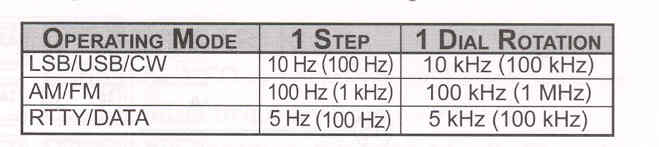
This large knob adjusts operating frequency of VFO-A. Clockwise rotation of this knob increases the frequency. Default tuning increments are 10 Hz (CW, SSB), 50Hz (RTTY/DATA), 100 Hz (AM/FM). When the [FAST] button is pressed, the tuning steps increases. The available steps are:

ADVICE:
The tuning steps for the Main Tuning Dial knob are set, at the factory, to: 10 Hz (SSB, CW), 50 Hz (RTTY/DATA) and 100 Hz (AM/FM) per step. Via Menu item "151 CW DIAL STEP" to "155 SSB DIAL STEP", however, you may changed these settings to 1 or 5 Hz (SSB, CW), 1 or 10 Hz (RTTY, DATA), and 10 Hz (AM, FM), instead.