Page 104 FTDX1200 Operating Manual

RTTY (RADIO TELETYPE) OPERATION Cont'd

Previous Page    Index of Topics    Table of Contents    Index of Pages    Next Page

RTTY TEXT MEMORY (WITH OPTIONAL FFT UNIT)

Phrases (up to 50 characters) frequently used in RTTY transmission can be memorized by connecting the optional FH-2 Remote Control Keypad to the real panel REM jack. Five phrases can be stored, and the memorized contents can be transmitted by operations on the FH-2.


Text Message Programming

    1. Press the [MODE] button to set the operating mode to RTTY.

    2. Press the FH-2 [MEM] key. A blinking "REC" icon will appear in the display.

    3. Press the FH-2 [1] ~ [5] key to select the desired RTTY Text Memory Register into which you wish to program the text, the blinking "REC" icon will disappear.

    4. Use the FH-2 [◄] and [►] keys to set the cursor position and use the FH-2 [▲] and [▼] keys to choose the letter/number to be programmed in each slot of the memory.

ADVICE:
You may also use the [VFO-B/CLAR] knob to program the message characters.

    5. When the message is complete, add the "↵" character at the end to signify the termination of the message.

    6. Press and hold in the FH-2 [MEM] key for one second to exit, once all characters (including "↵") have been programmed.


On-The-Air RTTY Text Message Playback

Press the FH-2 [1] ~ [5] key, depending on which RTTY Text Message Register message you wish to transmit. The programmed message will be transmitted.


End of "RTTY Text Memory (with Optional FFT Unit)"


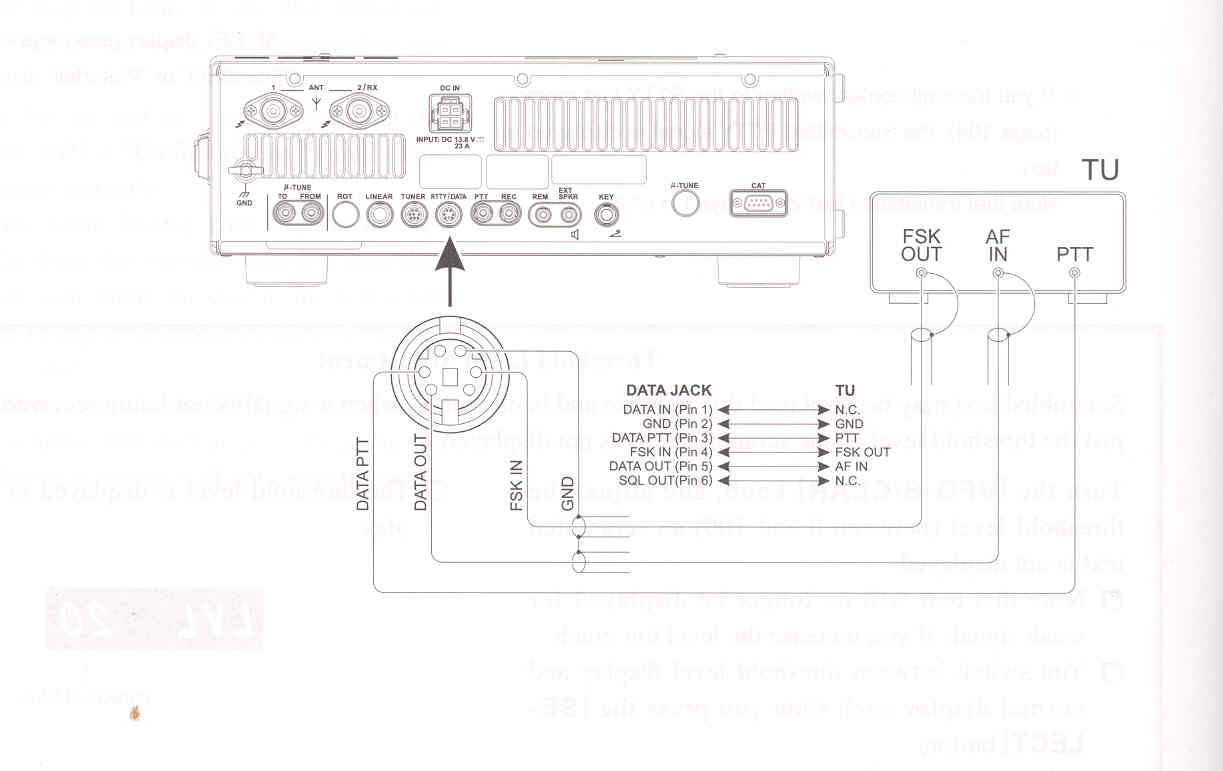
EXAMPLE OF CONNECTING RTTY COMMUNICATIONS DEVICE


Connect the RTTY communications TU (Terminal Unit) to the rear panel RTTY/PKT terminal. Be sure to read the instructions manual of the device to connect when connecting.

See page 132 for details on the connections and settings to use the optional USB Interface Unit "SCU-17".

ADVICE:

You can adjust RTTY data output leven using Menu item "096 RTTY OUT LEVEL".


End of "Example of Connecting RTTY Communications Device"

End of "RTTY (Radio Teletype) Operation"

Previous Page    Index of Topics    Table of Contents    Back to Top    Index of Pages    Next Page

Page 104 FTDX1200 Operating Manual