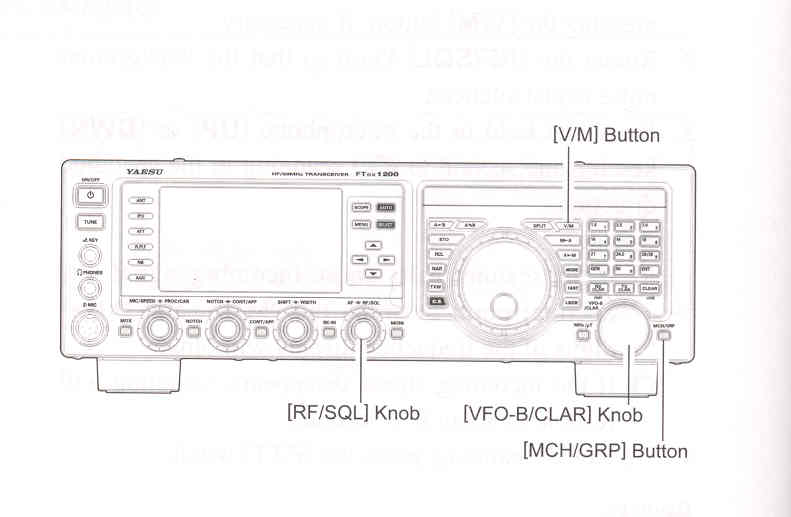
1. Store the Lower and Upper tuning/scanning limit frequencies into the memory pair "P-1L" and "P-1U", respectively, or any other "L/U" pair of memories in thespecial PMS memory area. See page 94 for details regarding memory storage.
2. Press the [V/M] buttom to enter the "Memory" mode.
3. Press the [MCH/GRP] buttom momentarily. The LED's indicating the Memory mode will illuminate.
4. Rotate the [VFO-B/CLAR] knob to select memory channel "P-1L" or "P-1U".
5. Rotate the [RF/SQL] knob so that the background noise is just silenced.
6. Turn the Main Tuning Dial knob slightly (to activate memory tuning). Tuning and scanning are not limited to the range within the P-1L/P-1U limits until you press the [V/M] button to return to memory channel or VFO operation.
7. Press and hold in the microphone [UP] or [DWN] key for one second to start scanning in the specified direction.
ADVICE:
8. If you rotate the Main Tuning Dial knob in the opposite direction from the current scanning direction (in other words, you rotate the dial left when scanning toward a higher frequency), the direction of the scan will reverse.
9. If you press the microphone PTT switch during scanning, the scanner will halt at once. Pressing the PTT switch during scanning will not cause transmission.