FTDX1200 Operating Manual Page 101

VFO AND MEMORY SCANNING Cont'd

Previous Page    Index of Topics    Table of Contents    Index of Pages    Next Page

MEMORY SCANNING


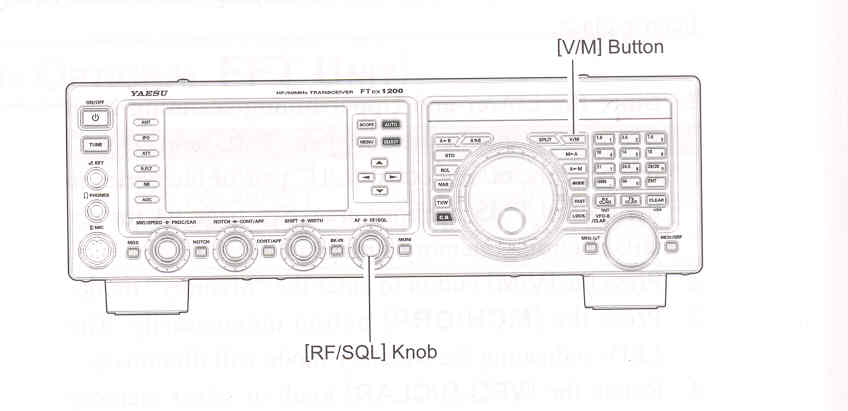
    1. Set the transceiver up in the "Memory" mode by pressing the [V/M] button, if necessary.

    2. Rotate the [RF/SQL] knob so that the background noise is just silenced.

    3. Press and hold in the microphone [UP] or [DWN] key for one second to start scanning in the specified direction.

ADVICE:

If the scanner halts on an incoming signal, the decimal point between the "MHz" and "kHz" digits of the frequency display will blink.

If the incoming signal disappers, scanning will resume in about five seconds.

    4. To cancel scanning, press the PTT switch.

ADVICE:

During Memory Group operation, only the channels within the current Memory Group will be scanned.

If the scan has paused on a signal, pressing the microphone [UP] or [DWN] key will cause scanning to resume instantly.

If you press the microphone PTT switch during scanning, the scanner will halt at once. However, pressing the PTT switch during scanning will not cause transmission.

You may select the manner in which the scanner resumes while it has paused on a signal, using Menu item "048 MIC SCAN RESUME". During Memory Scanning, the default "TIME" (5sec) setting will cause the scanner to resume scanning after five seconds. However, you may change this setting to resume only after the carrier has dropped out, if you like.

QUICK POINT:

If you have no interest in scanning, and wish to prohibit the microphone [UP] / [DWN] keys from initialating scanning, you may disable scanning control from the microphne using Menu item "047 MIC SCAN" (set it to "DISABLE").



End of "Memory Scanning"

End of "VFO and Memory Scanning"

Previous Page    Index of Topics    Table of Contents    Back to Top    Index of Pages    Next Page

FTDX1200 Operating Manual Page 101